YouTube to 3GP is indeed in high demand at present. We can easily discover lots of questions about how to download YouTube videos in 3GP format on Quora, Yahoo Answers and the similar. Although solutions are all over the internet, some people still seek for a perfect method to meet all the needs like simple work, high quality of resulting 3GP file and so on. In this article, we will lead you to easily download and convert YouTube videos to 3GP with original quality.
What Is YouTube?
Everybody is familiar with YouTube, the biggest video-sharing site gathering almost all sorts of video types on this site, music, movies, sports, news, gaming and even 3D, virtual reality, 360 videos. Besides, live streams are open to all YouTube visitors telling what’s showing right now. We can easily explore videos via channel, search keywords and free watch them online. A registered user has more rights, to upload, create channel/playlist, subscribe uploaders, thumb up and comment a video. Till 2016, YouTube gets 300 hours of uploaded videos, 5 billion watched videos per day and attracts 1 billion users.
What Is 3GP?
3GP is a multimedia container format storing videos MPEG-4 Part 2, H.263 or MPEG-4 Part 10, audios AMR-NB/WB/WB+, AAC-LC, HE-AAC v1/v2 and 3GP Timed Text. It is designed for 3G phones so that most 3G capable mobiles can play and record 3GP videos. Players like Windows Media Player, QuickTime, VLC can support 3GP as well. Because of small size, 3GP becomes a popular format for mobile phones, MP4 players. On the other hand, it delivers low resolution and has bad compatibility with new devices.
Why We Need to Convert YouTube to 3GP?
Compared with watching YouTube videos online, some people prefer to download favorite ones for skipping ads, cutting loading time and getting smooth playback on subway, bus, train and other places without Wi-Fi. Generally speaking, the higher quality YouTube video is, the bigger size it will be. It is a good choice to convert and compress YouTube to small-sized 3GP file to save space on a compatible mobile phone.
How to Convert YouTube to 3GP?
WinX HD Video Converter Deluxe is an all-in-one YouTube downloader and converter available to download any video from YouTube and convert to 3GP or other general formats, like MP4, AVI, WMV, MOV etc. It has a modern and clean design helping users to fully understand how to perform the operation without guesswork. Advanced technologies, like Hyper-threading tech, Multi-core CPU and Hardware Encoder (Intel QSV, Nvidia CUDA/NVENC) support, brings a supreme fast download and convert speed. High Quality Engine guarantees vivid images and hi-fi audio of output file. And, tech-savvy users can set specific parameter values for video/audio to get a better playback effect on particular devices.
Download and install WinX HD Video Converter Deluxe on your Windows (10) PC. Mac users please switch to Mac version. Next, follow the steps to convert YouTube to 3GP.
Step 1. Open WinX HD Video Converter Deluxe and click YouTube URL, the second button on the left of navigation bar.
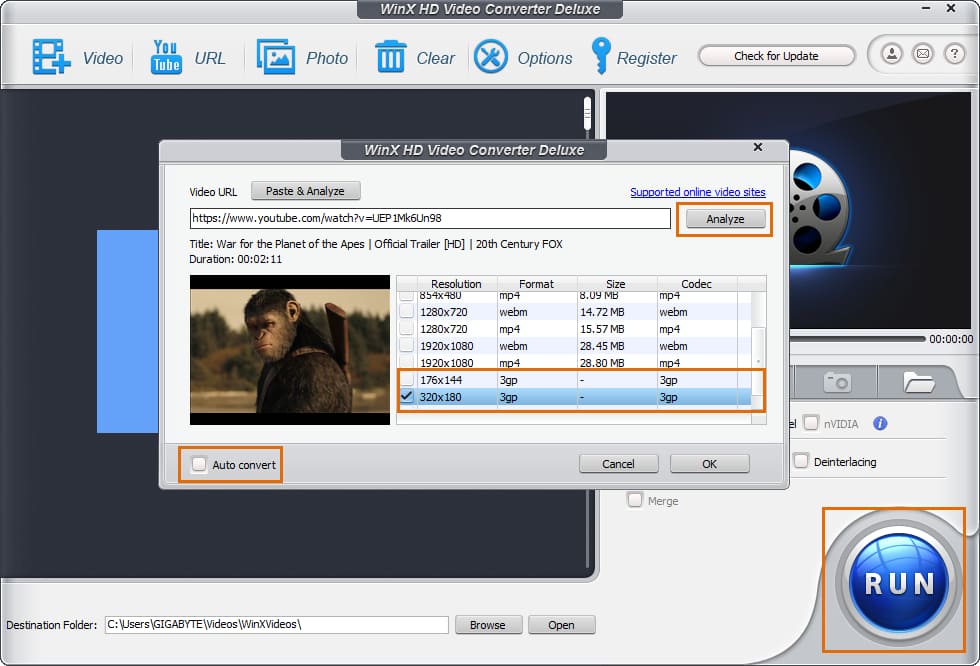
Step 2. Open YouTube and search for the video you want to convert to 3GP. Copy and paste its URL to address bar of the pop-up window in WinX HD Video Converter Deluxe. Click Analyze button to access to video info, including title, duration and a list of video versions varying from resolution, size, format and code. Select one version and click OK.
Tip: Auto convert option is checked by default. If there is a 3GP version, you can uncheck it and click the big blue RUN button to direct download YouTube video in 3GP format without conversion. Otherwise, freely choose one and convert later.
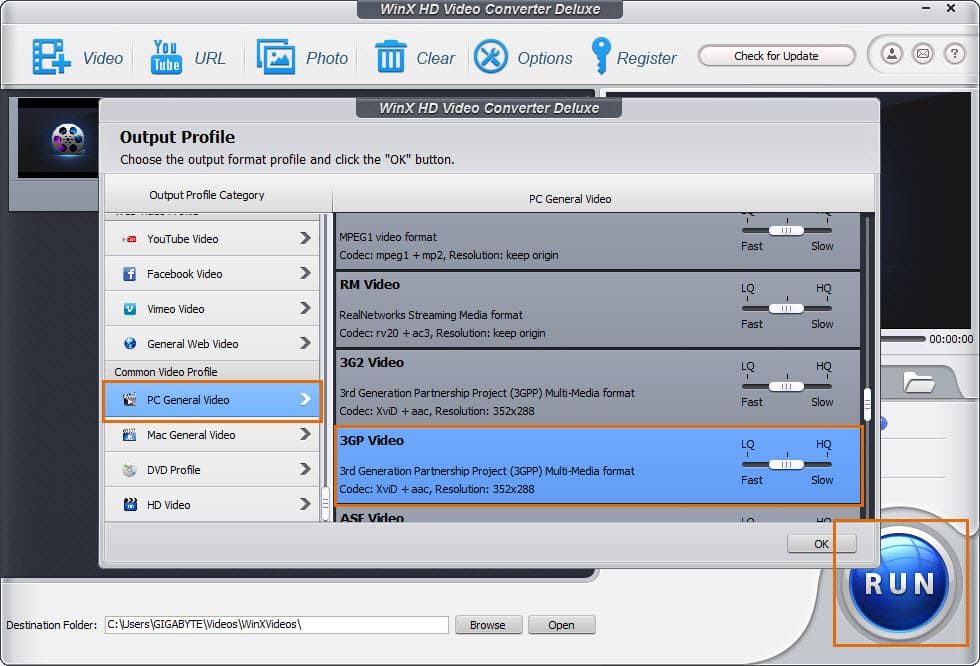
Step 3. The moment video is added to convert list, Output Profile dialogue pops up. Several categories are shown on the right column. Move to PC General Profile and find 3GP Video (codec: XviD + aac). Click OK.
Step 4. Browse to set destination folder. Hit RUN button to start YouTube to 3GP conversion.