显示标签为“DVD”的博文。显示所有博文

2018年8月13日星期一

How to Convert DVD VIDEO_TS Folder to AVI with High Quality

Q: "I would like to convert the folder named VIDEO_TS for my DVD into a single AVI file so I can download and play it in my player. Is there a program out there that can do such a conversion in Windows environment? Ease of use and short conversion time is important."

VIDEO_TS directory is the major component of DVD video. In a VIDEO_TS folder, VOB files contain primary data, including video, audio, subtitles, menus and other video-related data; IFO files store control information to navigate a DVD player to play DVD content properly, such as chapters, audio/subtitle streams and so on; and BUP files are used as copies of IFO files in case some IFO files are corrupted.

VIDEO_TS folder can be opened on hard drive after inserting a DVD into computer. DVD player software allows you to view the content. However, it is unplayable on a device and non editable unless you can make a digital copy from the whole folder. Here, we will introduce an easy and fast way to convert VIDEO_TS to AVI for better playback, editing and online uploading.

You Need a Program to Convert VIDEO_TS to AVI

WinX DVD Ripper Platinum stands out as the best VIDEO_TS to AVI converter. As a professional DVD ripper with over 10 years' development, it can well digitize DVD disc, DVD folder (VIDEO_TS) and ISO image into various video formats.

WinX DVD Ripper Platinum has a pleasing interface without confusing design. Only 3 steps, load DVD > select output > run and you can get a desired resulting file. It boasts the support of virtually all VIDEO_TS folder no matter whether it is encrypted. Generally, commercial DVD distributors use copy protections like CSS, region code, RCE, Sony ArccOS, Disney DRM or some other complex schemes on discs for preventing people from copying the content.

WinX DVD Ripper Platinum utilizes hardware acceleration to produce a superfast pith WinX, you can remove all those encryptions and convert VIDEO_TS folder to AVI encoded with Divx or Xvid and other popular formats like MP4, MKV, MOV, FLV, 3GP. erformance. It makes full use of Intel QSV and NVIDIA NVENC to make GPUs to process conversion task with accelerated speed while CPU is freed up to manage other tasks. In addition, this VIDEO_TS to AVI converter can output an AVI file maintaining almost lossless quality.

How to Convert VIDEO_TS to AVI

Free download and install WinX DVD Ripper Platinum on your computer. Next, follow the tutorial to convert whole VIDEO_TS folder to a single AVI file.


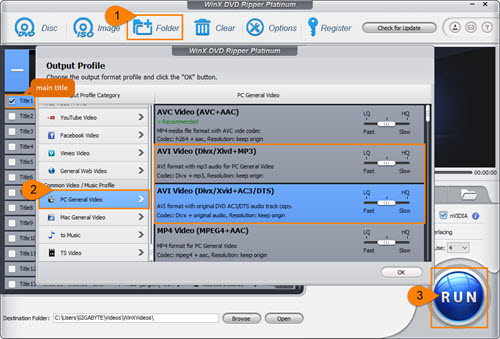
Step 1. Insert a DVD disc into DVD drive. Launch WinX DVD Ripper Platinum and click +Folder button. A dialogue box appears asking you to select the DVD folder. Click Browse button to import VIDEO_TS and click OK.

Step 2. After the folder is loaded, all titles included in VIDEO_TS will be listed. WinX DVD Ripper Platinum will automatically detect the main title and select it.

Meanwhile, Output Profile window pops up. Find PC General Video from category and select AVI Video as output format. There are two profiles: AVI Video (Divx/Xvid +MP3) and AVI Video (Divx/Xvid+AC3/DTS). If you try to keep original audio tracks, the later profile is better. Next, click OK.

Tip: Hundreds of output profiles are divided into multiple categories including General Profiles, DVD Backup Profile, Device Profile, Web Video Profile, to Music and more allowing you to convert VIDEO_TS folder to a matching format for playback, editing or uploading. 

Step 3. Click Browse button to set a destination folder if necessary. Then, click RUN button to start converting VIDEO_TS to AVI.
Notice:
• Hardware accelerator (Intel or NVIDIA according to your graphic cards) has been enabled. If you need a fast conversion speed, keep it turned on.
• You're suggested to tick Safe Mode option if you are trying to convert an encrypted VIDEO_TS folder in case interruptions during conversion.
• Disclaimer: Digiarty Software does not advocate ripping copy-protected DVDs for any commercial purpose and suggests referring to the DVD copyright laws in your countries before doing so.


2018年7月11日星期三

How to Rip Movies from DVD

Ripping movies from DVD is an increasing demand nowadays. DVD collectors need digital copies of DVDs to better preserve movie content on hard drive. Someone who has a movie on DVD requires putting it in portable devices for watching wherever. Honestly, it is not a hard task to rip movie from a DVD. Various programs in the market are announced as worthy solver to extract movie files from DVD in a breeze. What is the best DVD movie ripper? How to rip movies from DVD? We will lead you to get satisfied answers.

WinX DVD Ripper Platinum – Best Choice to Rip Movies from DVD

Some free DVD rippers have gained popularity to transcode DVD to digital files, e.g. HandBrake, which indeed offers available solution to rip movies from DVD while has obvious defect of unable to circumvent copy protections on DVD by itself. As a matter of fact, DVD distributors always employ stubborn schemes to encrypt DVDs (especially for movies on DVD) from reproducing for copyright reason. Therefore, you'd better choose a more powerful program which is able to copy protected DVDs.

WinX DVD Ripper Platinum is our recommendation. It is an expert to support a large range of DVDs, from old scratched discs to newly released movies, with removal of CSS, region code, Sony ArccOS, Disney DRM and other encryptions. Built in 350+ video/audio codecs, it can rip movies form DVD to MP4, H.264, AVI, MOV, FLV, 3GP and other mainstream format with ease. It offers plenty of presets embracing virtually all popular devices, iPhone, iPad, Apple TV, Samsung, Huawei, Surface Pro/Book, Xbox, PS3/4 etc, with precisely calculated parameters fully fitting with video playback specs of various mobiles.

This best DVD movie ripper also concentrates a lot on quality and speed. High Quality and De-interlacing Engines can greatly optimize quality of resulting file to output vivid graphics and hi-fi audios. And, video audio not syncing problem will never happen. Taking full advantage of Hardware Acceleration (Intel QSV/Nvidia NVENC), plus Super Encode Engine, Hyper-threading tech, it shows an extremely fast speed to rip movies from DVD, about 10 minutes to convert a 2 hour movie (depending on DVD drive and computer configuration).

How to Rip Movies from DVD with WinX DVD Ripper Platinum

WinX DVD Ripper Platinum is compatible with Windows 10 (32&64 bit) and lower version. It also arrives with a Mac version enabling you to rip movies from DVD on macOS High Sierra and lower. At the beginning, please download and install matched version on your computer. Next, follow the guide to rip movies from DVD.


Step 1. Input Source DVD
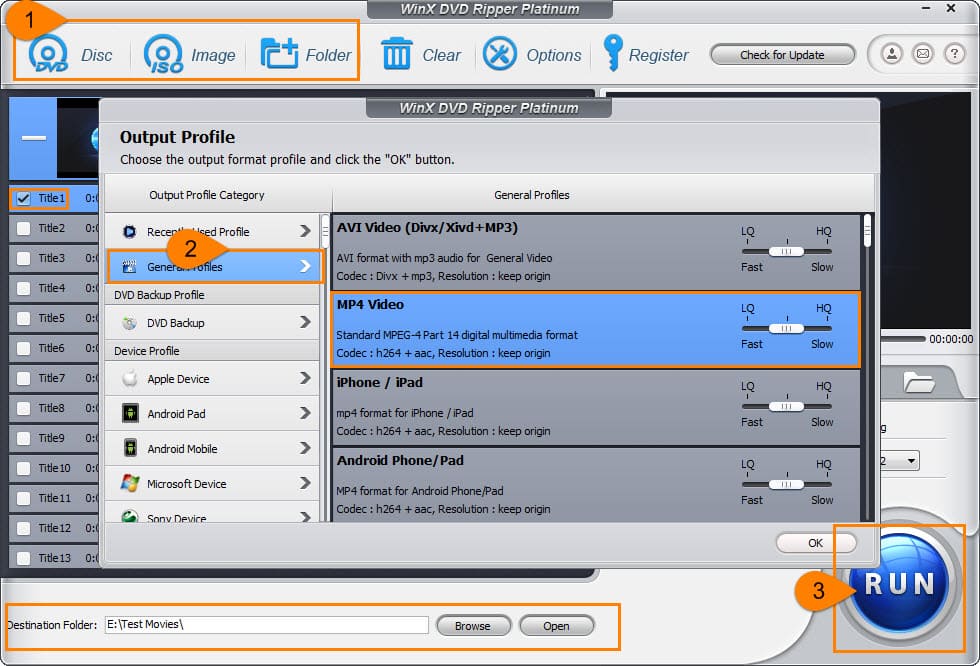
Insert the DVD movie disc into DVD drive. Launch WinX DVD Ripper Platinum and click DVD Disc button. The dialogue box appears asking you to select source DVD disc. Do it and click OK.

Tips:
• Generally, the source DVD will be automatically detected if there is only one DVD in optical drive.
• There are some options of DVD Disc File Format Type. If you have no idea of the type, keep the default option: Auto Detect. 

Step 2. Select Output Format
Seconds later, all titles of the DVD movie will be loaded with checked main title. Meanwhile, Output Profile window appears. Move to General Profiles category and select MP4 Video (codec: h264+aac). Click OK.

There are several other categories provided, device profile, web video profile, DVD backup profile, to music and more. You can select any format or device model under corresponding category as output format according to your needs.

Step 3. Run to Rip Movies from DVD
If necessary, click Browse button to define a new folder to save the ripped movie file. Then, click RUN button to start DVD ripping.

Tip: You're suggested to tick Safe Mode option if you have a newly released DVD movie to convert the DVD more successfully.


After the process is finished, destination folder saving the extracted movie file will be opened. You can play it immediately or transfer to iPhone, iPad, Android for flexible playback.

Disclaimer: Digiarty Software does not advocate ripping copy-protected DVDs for any commercial purpose and suggests referring to the DVD copyright laws in your countries before doing so.

2018年3月7日星期三

How to Fast Rip DVD Dunkirk to MP4, AVI, WMV, MOV etc.

Dunkirk, a Christopher Nolan film in 2017, was highly praised in many aspects from direction, film editing to music. It received 8 nominations at Oscar 2018 and eventually won 3 awards, incl. Best Film Editing, Best Sound Editing and Best Sound Mixing. Although it's a regret that Dunkirk wasn't awarded as the Best Picture which went to The Shape of Water, it is an amazing film worth your watching. Every of you can enjoy Dunkirk on DVD even though you missed it in cinema. You also have a chance to watch Dunkirk on mobiles by digitalizing the DVD. Here, we will introduce a solution helping you rip DVD Dunkirk quickly and easily.

Best Program to Rip DVD Dunkirk

DVD ripping software is a good helper which enables you to convert or copy a DVD with ease. But not all DVD rippers can handle Dunkirk DVD because of copy protection. Some big names (HandBrake, VLC) fail to digitalize this DVD movie. Is there an available program which can rip copy-protected DVD?

WinX DVD Ripper Platinum focuses on offering the most efficient solution to rip DVD to digital. It supports a large range of DVDs, from home-made to commercial. It is available to remove copy protection from DVD movies (Dunkirk included), TV shows, 99-title DVDs, workout DVDs and more.

Built-in 350+ video/audio codecs and device profiles, it can easily rip Dunkirk DVD to MP4 (H.264), AVI, WMV, MOV, FLV, 3GP, iPhone, iPad, Android, Windows Mobile, Xbox, PS3/4 etc. It also offers copy modes helping you 1:1 clone DVD to ISO Image, VIDEO_TS folder or back up main/full title as a single MPEG2 file.

Taking full advantage of High Quality Engine and De-interlacing Engine, you can get an output file with vivid images and hi-fi audio ripped from Dunkirk DVD. What’s more, Super Encode Engine, Multi-core Utility and Hardware Encoders (Intel QSV, Nivdia NVENC) can greatly accelerate DVD ripping speed.

How to Rip DVD Dunkirk with WinX DVD Ripper Platinum?

Beyond everything, you should download and install WinX DVD Ripper Platinum on computer. The Windows version is available for Windows 10 or lower and Mac version for macOS High Sierra or lower.


This guide shows how to rip DVD Dunkirk to MP4 on Windows 10. Mac user guide shares the same workflow.

Step 1. Load Dunkirk DVD
Insert Dunkirk DVD into DVD drive. Launch WinX DVD Ripper Platinum and click DVD Disc button. A dialogue box appears asking you to select the source DVD disc. Generally, the DVD will be automatically detected and selected. Click OK.

Step 2. Select MP4 as Output Format
All titles of this DVD will be loaded soon. Main title is auto-checked. Meanwhile, Output Profile window pops up. On the left side, categories are listed. Go to General Profiles > MP4 Video (codec: h264+aac) > OK.

Step 3. Start DVD Dunkirk Ripping
If necessary, click Browse button to set a new destination folder. At last, click RUN button to start ripping. After the process is completed, destination folder which saves the ripped file will pop up. You can play it later or transfer the video file to iPhone, iPad, Android for watching on the move.


2017年6月12日星期一

How to Troubleshoot "Can't Burn DVD on Windows 10" Problem

"I can't burn a DVD since upgrading to Windows 10. When I try using Windows Media Player, it says to connect to a burner and try again. Why can't I burn a disc and should I have to get a new burner?"
Windows DVD Maker is no longer available on Windows 10, which produces a hard task to burn a DVD disc on Windows 10. "Can't burn DVD on Windows 10" problem involves people who want to copy digital files to DVD disc into trouble. How to fix this DVD burning problem to make a DVD copy from any video file on Windows 10 correctly? Follow us!

Windows 10 Still Give Options for DVD Burning? Not Exactly!

Windows Media Player for Windows 10 features a CD/DVD burning function allowing users to burn items (music, photos, video clips) in Player Library to disc. Open the help page and we can get a detailed explanation of how to burn disc using WMP on Windows 10.
Some people successfully burn disc via DVD drive with Windows File Explorer.
• Insert a black readable disc into DVD drive.
• Open File Explore and find the DVD drive (for example drive G:)
• "Burn a Disc" window pops up. Enter disc title and select how I want to use the disc, like a USB flash drive or like a CD/DVD Player. Click next and a temporary folder named "Files ready to be written to disc (1)" storing one file desktop.ini will appear in drive G:.
• Now, drag files you want to burn to disc to this temporary folder in drive G:.
• Select "Manage" menu and click "Finish burning" button.
• Follow the wizard to set disc title, recording speed, disc format (CD or data DVD) to finish DVD burning.
As a matter of fact, the above two methods are only able to burn files to data DVD which can be readable and writable on computer but cannot play in a DVD player. Therefore, we still can’t burn a movie/video to DVD on Windows 10 available for DVD player.

How to Fix "Can't Burn DVD on Windows 10" Problem

To escape from "Windows 10 won't burn DVD" trouble for copying any files to a disc playable on PC and in DVD player, it is strongly suggested to get help form 3-rd party DVD burning software.
WinX DVD Author is a high-rated DVD burner for Windows (10/8.1/8/7/Vista/XP). It boasts to convert videos in virtually all mainstream formats (H.265/H.264, MKV, AVI, WMV, MOV, MTS, FLV etc.) as well as ISO image to NTSC/PAL DVD. Customizations are available as well. We can optionally make DVD menu/chapter, insert SRT subtitles, set background music/image and change aspect ratio as 16:9 or 4:3 for widescreen or standard TV. With powerful decoder and encoder engine, it delivers a super fast DVD burning speed, about 1 hour to make a full 4.3G high quality DVD. Supported DVD formats include DVD+/-R, DVD+/-RW, DVD DL+R and DVD DL+/-RW. In addition, it is totally free and safe bundled no malicious software and virus.
How to Burn a DVD on Windows 10 with WinX DVD Author
Step 1. Download and Install WinX DVD Author
Download WinX DVD Author to your Windows 10 PC. After the .exe file is downloaded, double click it to install this Windows 10 DVD burner following the wizard.
Step 2. Import Burning Files
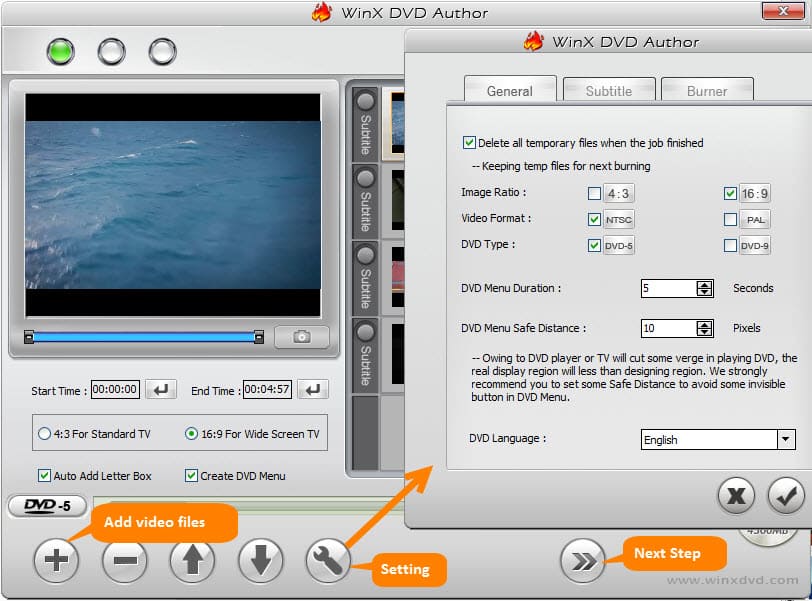
Insert a blank DVD disc into DVD drive at first. Then, open WinX DVD Author and click Video DVD Author button. Another window appears. Click + button to add video files you want to burn to DVD. Click next step button.
Tip: Under the preview monitor, there are some options enabling you to set start/end time and aspect ratio. Two options Auto Add Letter Box and Create DVD Menu are checked by default. You can uncheck them depending on your own needs. Also, setting gear button can lead you to access to the setting window to adjust general DVD info, add subtitles and more.

Optional. Create DVD/Chapter Menu
On the right column, you can select any of preset images as background picture for menu or add new one(s) from PC. On the right panel, you can set menu background text/music, add or delete menu button on video clips. After all settings are done, click next step button. >> Learn how to create DVD menu…
Step 3. Burn to DVD
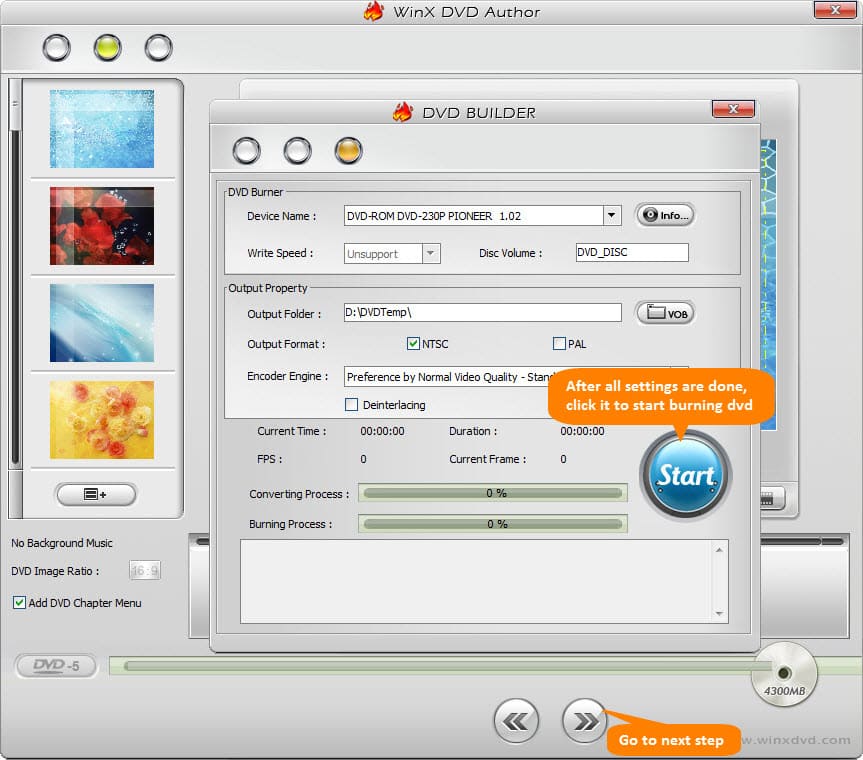
DVD Builder dialogue pops up with 3 panels, DVD Burner, Output Property and process board. DVD device info will be automatically detected and listed. Now, go to Output Folder which is sued to save temporary VOB file which is converted from imported video files and then will burn to DVD later. Select the output format as NTSC or PAL according to your region. Finally, click Start button to starting DVD burning on Windows 10.

2017年4月9日星期日

Best 3 DVD to MP4 Converter Freeware for Windows

Nowadays, most (over 50%, according to a research) prefer to use digital methods, maybe a streaming video subscription to purchase or rent movies or TVs. However, this research also says that 41% people use both digital and physical methods, and 20% insist on physical DVDs only. Also we can see the popularity of DVDs from DVD sales in United States of 2016.

To sum up, digital is popular while DVD disc isn't dead. There're also countless DVD enthusiasts. They love DVD discs, but meanwhile enjoy converting DVDs to MP4. After all, they will get a digital copy which is easy to manage on virtually all electronic devices, and helps keep their discs away from mishaps.

So here we will hold out 2017 best 3 DVD to MP4 converter free software for Windows users (some are available for other platforms as well) and explain workflow one by one, to help you rip both unencrypted and copy-protected DVDs to HD MP4 without quality loss and without spending a penny.

No.1 free DVD to MP4 converter - WinX DVD Ripper

Rating: ★★★★☆
Supported Windows OS: Windows 10, 8.1, 8, 7, Vista, XP
Supported DVD files: DVD disc, DVD folder
Supported DVD copy protections: CSS, UOP, RCE, region code and Sony ARccOS

WinX DVD Ripper is a totally free DVD to MP4 converter for both 32 bit and 64 bit Windows computer. And it has a Mac edition. After years of continuous development, it becomes an expert in DVD ripping, featuring fast DVD ripping speed, high-quality output, decryption ability to remove various copy protections alone, broad compatibility, and so on. In addition to general MP4 profiles offering two available video codecs - H.264 and MPEG4, it also provides a number of premade MP4 profiles for iPhone, Apple TV, iPod, Samsung, PSP and HTC. Therefore, the resulting MP4 file will be fully compatible with users' device without modifying settings.

How to free convert DVD files to MP4 with WinX DVD Ripper?

To begin with, download and install this free DVD to MP4 converter on PC. And then 4 steps later, you'll get a MP4 copy with everything you need.

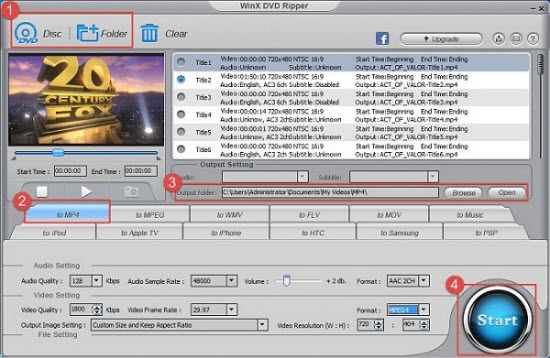
Step 1. Open WinX DVD Ripper, and then click on "DVD Disc" or "DVD Folder" button to load target DVD file.
Step 2. Navigate to output profiles tabs, hit "to MP4" or choose a MP4 profile under certain device profile tab.
Step 3 (optional). Change default output settings if you think it is necessary, for example, subtitle track, output folder, audio/video bit rate, sample rate, video resolution. Besides, this DVD to MP4 converter free software allows trimming video to cut off unwanted part.
Step 4. Click on "Start" button to begin processing DVD to MP4 conversion.

No.2 DVD to MP4 converter freeware - Handbrake

Rating:★★★★
Supported Windows OS: Windows Vista to 10
Supported DVD files: DVD disc, DVD folder, ISO image
Supported DVD copy protections: None

Handbrake is another time-honored free and open source video transcoder that can convert videos, blu-ray and DVD discs to MP4 and MKV. Before Christmas 2016, Handbrake team took out Handbrake 1.0.0 which has got major improvements. It adds general presets, and presets for web and devices, while keeping legacy presets. Handbrake is an ace free DVD to MP4 converter in terms of ripping unencrypted DVDs. As for converting copy-protected DVDs to MP4, it is far weaker than WinX DVD Ripper. It can only rip CSS-protected DVDs even if VLC libdvdcss is installed.

How to free rip DVD to MP4 with Handbrake?

Likewise, you need to download and install Handbrake first. Go to https://handbrake.fr/downloads.php, and get the proper version downloaded. Next, following the guide below.

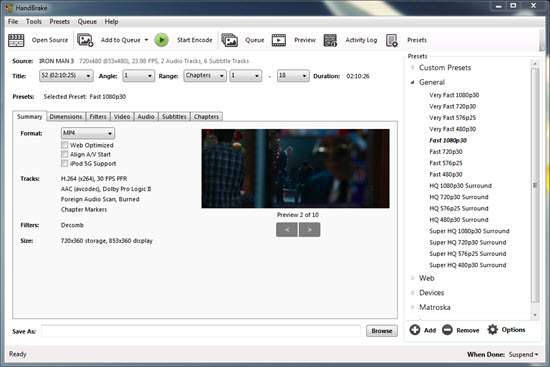
Step 1. Run Handbrake, hit "Open Source" to load the DVD you want to convert to MP4.
Step 2. Set destination folder to save output and choose MP4 as container.
Step 3. Hit "Start Encode" to order this free DVD to MP4 converter to start conversion.

No.3 free DVD to MP4 converter - Free DVD Video Converter

Rating: ★★★☆
Supported Windows OS: Windows 10, 8, 7, Vista, XP SP3
Supported DVD files: DVD disc
Supported DVD copy protections: None

Free DVD Video Converter is a Windows-based tool specially designed to convert Blu-ray discs and video DVDs to MP4, AVI, and MKV video for iPhone, Apple TV, iPod, PSP, PS3, BlackBerry, Xbox and computer. But just like Handbrake, this free DVD to MP4 converter software can rip unprotected files only. Another important thing is that it is ad-supported. It includes links to other websites and third-party apps installations including toolbars. Luckily, it allows you to uncheck them while installing. So be careful in the process of installation.

How to convert a DVD to MP4 with Free DVD Video Converter?

Again you should download and install it first, and then move to the next thing.
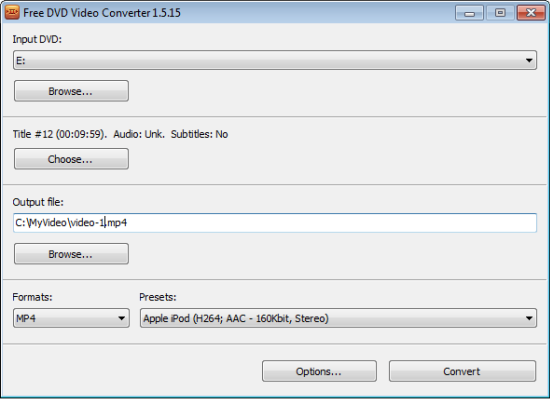
Step 1. Double click on the icon of Free DVD Video Converter to open it. You'll see the screenshot is very straightforward. Browse and select target DVD.
Step 2. Hit "Choose" to select title, audio and subtitles. Hit "Browse" under "Output file" to name a location. "MP4" under "Formats" and choose a preset. Finally, hit "Convert" to begin converting DVD to MP4 at no cost.


2016年10月9日星期日

"DVD Won't Play on Windows 10" Troubleshooting Tips

The removal of Windows Media Center makes DVD playback become troublesome on Windows 10, while a new Windows DVD Player priced at $14.99 is pushed out by Microsoft to fix DVD not playing on Windows 10 error. However, this app receives a quite low rating (average 2.0) and lots of negative reviews for various bugs.go fullscreen. For example:

- I restarted my computer twice and it still would not play my DVD. It keeps giving me an error message. 
- It reads some DVD but others it says it cannot decode them. Windows NEEDS to debug this app. 
- Can't rewind or fast forward otherwise the speed gets out of sync and it won't go back to normal play mode. 

If you have a bad experience with Windows DVD Player, why not try the following solutions to escape from "DVD won't play on Windows 10" problem.

DVD Won't Play on Windows 10 Troubleshooting Tips

1. Rip DVD to Video and Play with Windows Media Player

Windows Media Player 12 still works well on Windows 10, capable of playing traditional Windows supported formats (WMV, AVI) and new added codecs, MP4, MOV, M2TS. If your DVD won't play on Windows 10, you can opt for ripping DVD to file types acceptable by Windows Media Player.

WinX DVD Ripper Platinum is a good helper to convert DVD to MP4, AVI, WMV etc, for later playing on Windows 10 successfully. It is powerful on encoding both home-made DVDs and commercial encrypted DVD movies/TV shows. Thanks to continuous upgrade, it can handle latest DVD movies protected by new schemes. Integrating with High Quality Engine, Super Encode Engine and Hyper-threading Tech, this Windows 10 DVD ripper can deliver possible highest quality and a super fast conversion speed. In addition, it offers copy modes helping you 1:1 clone DVD to ISO image, VIDEO_TS folder or save main/full title to a single MPEG2 file for a long-time storage on hard drive. >> Guide of how to rip DVD to MP4 with WinX DVD Ripper Platinum on Windows 10


2. Download and Install Third-Party DVD Player for Windows 10

A plenty of Windows 10 DVD players gather in the market. Some of them are recognized as the best Windows DVD Player alternatives not only because they can easily solve "Windows 10 won't play DVD" problem but empower you to watch DVD on Windows 10 for FREE.

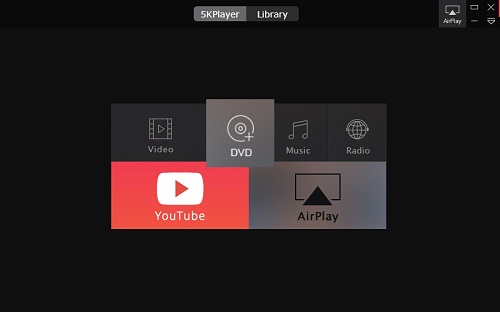
5KPlayer is a favored DVD player worthy our recommendation. It is designed as a multi-platform media player available to play DVDs, videos, audios on Windows (10) and Mac. It can bypass region codes to play a European DVD in United States and support all copy-protected DVDs with removal of CSS, RCE, Sony ArccOS, Disney DRM etc. In addition, it can keep DVD video quality originally without compression. Furthermore, it works as a video downloader allowing you free download movies, TV shows, music videos, sports etc, from 300+ sites and an AirPlay receiver/sender to stream videos, music from iPhone, iPad, iPod to Windows, Mac computer with larger screen. 5KPlayer is verified as 100% clean and safe bundled no adware, malware or virus.


Additionally, How to Do if DVD Won't Play on Windows 10 Caused by DVD Drive Not Working
• If DVD drive shows up in Device Manager but with a yellow exclamation mark or red x symbol, you need to reinstall the driver. Open Device Manager by directly searching it with search box on the taskbar. Expand DVD/CD-ROM drivers and right-click DVD device to select Uninstall. Click OK on pop-up box. Restart computer and the DVD drive will be reinstalled automatically.

• If you don't find DVD drive in Device Manager, you may have gotten a cable connection error or broken DVD drive. 
Please check if the DVD drive cables are probably connected. If no, re-connect securely and properly. If yes, you may need to replace the probably bad drive with a new one.

2016年5月17日星期二

DVD Ripper Review | How to Rip a DVD to MP4/H.264, AVI, etc on Windows 10 or Mac OS

What is a DVD Ripper?

A DVD ripper is by and large a DVD content extractor and backup software tool for preserving, playing and organizing better the media files, which are the backup copy of and output from original DVDs.

No one but WinX DVD Ripper can be qualified as the best free yet proprietary standalone DVD ripping software. Developed by Digiarty Software Inc., it is a desktop freeware excelling at converting any personally burned DVDs or copy-protected commercial DVDs to MP4/H.264, WMV, FLV, MPEG and the like digital files to hard disk/drive, USB, MicroSD card, etc, or ripping DVDs to fit iPhone, iPod, Android Samsung, HTC, PSP, etc. DVD-R, DVD+R or DVD+R DL (Double Layer) discs, of 4.7 or 8.5G are supported by the DVD ripper, no matter in NTSC or PAL.

We've singled out top 5 free DVD rippers via a side-by-side review: WinX DVD Ripper, HandBrake, MakeMKV, DVD Shrink, and Freemake Video Converter. Particularly, WinX DVD Ripper tops the best free DVD ripping software, for forthright interface easily accessible for all people, and rich features helping output awesome digital copy of DVD.

A. NO.1 Fast DVD Ripping Speed than Any Other Free DVD Rippers

WinX DVD Ripper quickly made a name for itself as the fastest free DVD ripping software, primarily for being easy to use and using unique Super Encode Engine based on MMX- SSE & 3DNow!. Plus the Hyper-threading technology, the time to rip DVD to MP4/MPEG/H.264, etc is only about one third (or less) the length of a movie.
If a free DVD ripper can't bypass any copy protection or clings to outdated decoding techs, no matter how great it was, it can't be fast now, or rather, it can't even successfully rip most DVDs without third-party tools, let alone rip DVD fast, just like famous HandBrake. WinX DVD Ripper supports most DVD encryptions, which will be presented in details in the following parts.
While many factors contribute to the fast DVD ripping speed, being stable becomes the most important one once disc ripping is off the ground. Any error may leave you in a spot where you have to start the ripping all over again. No surprise, WinX DVD ripper does very well at this point.
Here come the statistics. We did a 50 min movie DVD ripping test with top free DVD rippers mentioned above on 64-bit Windows 7 PC with Intel(R) Core(TM) i5-3470 CPU and 8GB RAM. The DVD ripping frequency of WinX DVD Ripper is 106 fps, using less than 15 minutes, while HandBrake 94.2 fps, using 17.18 minutes.

B. Versatile Input and Output Supported

This top free DVD ripper for Windows (10) is designed to perfectly handle all your basic DVD rip needs, including ripping (copy-protected) DVD to MP4, WMV, iPhone and many more. Firstly, let's take a look at its detailed supported input formats: DVD folder, DVD disc (DVD 5, DVD 9, DVD ROM, DVD-R, DVD+R, DVD-RW, DVD+RW). And then the supported output file formats: MP4, WMV, H.264, MPEG, MOV, FLV, MP3. More than that, if you have no idea about digital formats, just choose the platform or devices you want to rip DVD for playing on: iPhone, Apple TV, iPod, Android Samsung, HTC, PSP and many more.
Tips: Almost all copy-protected DVDs are supported well, with an exception of some strictly encrypted DVDs like Disney DVD with 99 titles. In this case, the upgraded version of free WinX DVD ripper is the way out.

C. Multiple Editing Options

Under the Output Setting area, you can click the dropdown button to specify another audio track, choose a subtitle track or disable the subtitle based on your own needs.
The video trim option lies beneath the preview window. If you want to cut off some clips, just move the bars or input the start time and end time.
Insert a DVD disc into DVD drive. MakeMKV will load disc info automatically. After disc reading process is completed, all the scanned titles will be listed. According to your needs, select main title, particular titles, or all listed titles for ripping. Specify the output folder and hit Make MKV button to get an excellent MKV copy with high definition from disc.
Besides, this free DVD ripper allows users to customize video audio parameters to get desired video/audio quality. You can tune video/audio bit rate, sample rate, format, video resolution, and volume. (Tip: If you are not good at this job, you'd better keep the default settings.)

D. Copy Protection Circumvention

Commercial DVDs are guarded with strict copy protections against reproduction of DVD contents. WinX DVD Ripper boasts its ability to bypass common DVD encryptions including CSS, UOP, RCE, region code and Sony ARccOS via built-in decrypter enabling users to rip copy-protected DVD to a digital file flawlessly.
We have tried to rip The Hunger Games: Mockingjay Part 2, one of popular newly released DVDs. This NTSC DVD for region 1 (U.S. and Canada only) contains feature film placed in main title (Title 1) and other titles with trailers, bonus and more. Import it to WinX DVD Ripper, check main title, select output format, for example MP4 and then start ripping. After that, we find this free DVD ripper can well handle encrypted DVD conversion and export a perfect playable MP4 file with full movie content.
However, WinX DVD Ripper should be upgraded to Platinum version if you need to rip Disney DVDs or some latest DVD movies encrypted with special protection schemes. Also, we suggest you to check "Safe Mode" to garner a 100% successful ripping process.

Steps to Rip DVD with WinX DVD Ripper

Before you start to rip DVD with WinX DVD Ripper, you need to insert DVD disc into the DVD drive of your computer. After that, download WinX DVD Ripper to your Windows PC and follow the steps below. Here we take ripping copy protected Frozen DVD for example:
Step 1 - Load DVD Disc to DVD Ripper
Click the DVD Disc icon to navigate to the Disc path, select and press OK to fast load DVD content into DVD ripper. Once fully uploaded, DVD details can be seen here, including (right) DVD title, video duration, aspect ratio, audio, subtitle etc.
Step 2 - Choose Output Format/Device
A dozen of output video formats and devices are provided here to rip your DVD movie into, e.g MP4, MPEG, FLV, MOV, Music, iPhone, Apple TV and PSP. Just specify one according to your actual needs to proceed.
Step 3 - Do Output Setting (Optional)
If the DVD movie owns multiple options of audio channels and subtitles, WinX DVD Ripper will list them in the Output Setting section and allow you to choose one. Moreover, the output folder and video/audio quality, sample rate, aspect ratio and video resolution are all available to reset as you prefer.
Step 4 - Start to Rip DVD
Press "Start" button to begin the DVD ripping process. Of course the DVD ripping time depends upon the size of DVD movie, as well as the specifications of your system.

Note: The DVD ripper developer only advocates ripping DVDs for personal use and suggests referring to the DVD copyright laws in your country before doing so.

2016年4月27日星期三

[Review] Top 5 Best Free DVD Rippers for Windows 7/8/10

DVD ripper is a necessary program for DVD owners when they need to backup DVDs or want to rip DVDs to digital files for easy management or playback on iPhone, iPad, Android Samsung, Sony Xperia, Microsoft Windows Phone and other devices. When it comes to choose a ripper, "free" is likely the prerequisite. It's easy to google out a free DVD ripper, but tough to figure out the real free, clean yet helpful one.

To help you stay away from ad-supported and malware-bundled free DVD ripping tools and catch the best one hassle free, we have sorted out the top 5 free DVD rippers for Windows and Mac, along with in-depth review.

2016 Top Free DVD Ripper # 1 - WinX DVD Ripper ★★★★★

OS: Windows 10/8/7, Mac OS X

We put WinX DVD Ripper in first place, based on some researches of users' preference about free DVD rippers. Yes, what really makes most people excited is a free DVD copier that extracting contents from piles or hundreds of DVD discs at an awe-inspiring speed primarily while maintaining the highest possible quality. One top-end option is WinX DVD Ripper, a critically acclaimed free DVD ripper software developed by Digiarty, for both DVD-ripping novice and experts.

Downloading and installing WinX DVD Ripper (10.2 MB) only takes you seconds and you are suggested to save it in folders other than C:\. Registration box will pop out, but you can choose to jump over it. After that, you are all set to backup any of your DVDs or DVD folders, be it homemade or commercial copy protected ones, such as CSS encryption, region code, Sony ARccOS, UOPs, APS and RCE. Feel free to rip DVD to MP4, MPEG, WMV, FLV, MOV, MP4, H.264, iPhone, iPad, Android, etc, using hardware acceleration technology MMX- SSE & 3DNow!. And relax, it is a completely free yet clean DVD ripping program.

2016 Top Free DVD Ripper # 2 - HandBrake ★★★★☆

OS: Windows, Mac OS, Linux

HandBrake is a cross-platform, open-source free video transcoder accompanying with the ability to rip DVD to MP4 and MKV. As a popular free DVD ripper, it undoubtedly owns many merits. Firstly, it is lightweight and clean. Secondly, it allows you to load DVD disc, as well as DVD folder and ISO file for further ripping. Thirdly, In addition to offering most popular MP4 and MKV as the outputs, it also provides optimized presets for prevailing devices including iPhone, iPad, iPod (touch), Apple TV, Android and WP8. Fourthly, various setting options are also included for advanced users to achieve desired result.

However, compared with WinX DVD Ripper, HandBrake has some shortcomings, especially on the decoding of copy-protected DVDs. What's more, output files accessible in WinX DVD Ripper, i.e. DVD to WMV, MOV, FLV, MP3, and the like, are absent in HandBrake.

2016 Top Free DVD Ripper # 3 - MakeMKV ★★★★☆

OS: Windows XP/Vista/7/8, Mac OS X 10.6 and above, Linux 

MakeMKV focuses on offering an effortless solution to rip DVDs, AVCHD discs, Blu-ray discs as well as ISO images to MKV while retaining all videos, audios, subtitles of selected titles from original source. Supporting multiple copy protection schemes (like CSS, region code), this free DVD ripper is available to read and rip encrypted DVDs. Importantly, it delivers a quite fast DVD conversion speed averagely costing half the time of the length of a feature film.

Insert a DVD disc into DVD drive. MakeMKV will load disc info automatically. After disc reading process is completed, all the scanned titles will be listed. According to your needs, select main title, particular titles, or all listed titles for ripping. Specify the output folder and hit Make MKV button to get an excellent MKV copy with high definition from disc.

We should inform you that MakeMKV is used as a free program for converting and streaming DVD/AVCHD discs while requiring a license key to rip Blu-ray after 30-day free trial. Otherwise, keep this free DVD ripper in latest beta version for making all functions free of use.

Verdict: MakeMKV earns its rank in best free DVD ripper list due to ease of use, disc copy protection support and fast ripping speed. But note that it only outputs MKV files, and thus you have to search a MKV player or transfer video into a more compatible format (MP4) via video converter for a smooth playback on PC/Mac and portable devices.

2016 Top Free DVD Ripper # 4 - DVD Shrink ★★★★☆

OS: Windows 7/Vista/XP/2000/95/98/ME
Latest version: The development of DVD Shrink was discontinued in May 2005, so the latest version you can download is DVD Shrink 3.2.0.15.
Supported input formats: DVD disc, DVD folder
Supported output formats: ISO Image file, DVD folder DVD copy protections supported: DVD region code, UOPs, APS and CSS. (Since it's discontinued, it is unable to remove recent copy protection technologies like Disney X-project DRM, Sony ArccOS, etc.)

DVD Shrink is known as Windows free DVD ripper software for ripping DVD to hard drive as DVD folder or ISO Image file. Better still, it can be used in conjunction with third-party DVD burning programs to make a copy of original DVD discs.

However, converting DVD files to MP4, AVI, MOV, iPhone or other videos/devices is not possible with this free DVD video converter, which only allows you to shrink DVD to folder or ISO. Furthermore, DVD Shrink can't remove new copy protections since it's not updated any more lone time ago, meaning ripping Disney DVDs can't be done with it.

2016 Top Free DVD Ripper # 5 - Freemake Video Converter ★★★☆☆

OS: Windows XP (SP3)/Vista/7/8/8.1/10

FreemakeVideo Converter, a high-praised video converter program, is really a feature-packed tool that is also capable of free ripping DVDs/Blu-ray discs and burning video to DVD disc/DVD folder/ISO image file.

As a free DVD ripper, Freemake Video Converter can rip general DVD movies to MP4, AVI, MOV, MKV, MP3, HTML5, iPhone, iPad, Android, PSP and more mainstream media formats and mobile devices. Its video editing feature allows you to rotate/cut output DVD video as you like, choose audio channel, as well as select/add subtitles to movie video. By leveraging CUDA and DXVA technology, the DVD (to H.264/MPEG2) ripping process is accelerated by 50% at most.

What a pity Freemake Video Converter cannot defeat any unwanted DVD copy protection schemes, neither DVD region code, CSS, REC, Sony ArccOS or Disney DRM. Moreover, it's not a clean tool and several annoying adware are foisted to install during the setup.

Pick a Lifetime Top Free DVD Ripper to Rip DVD - # Conclusion

Ripping DVD to friendly formats could be easy if you take the best free DVD ripper in hand. By reviewing the five best free DVD ripping tools and considering overall, most users give WinX DVD Ripper a vote, and we may attribute this to:

1. It's 100% clean, safe and free with no malware, adware, spyware or virus at all; extremely easy-to-use;
2. Supporting most new protected DVDs; various output formats and devices;
3. fast and nice output quality; perfectly compatible with Windows 10/8/7, etc.
Give this free DVD rip tool a try and you'll be amazed.

2016年4月10日星期日

2016 Top 3 Best DVD Decrypter Software for Mac [Free Download & Review]

DVD distributors always attach strict copy protections on DVD movies, TV shows and more to restrict backup and reproduction for unfair use, which push a lot of DVD owners, who would like to rip DVDs to digital files in order to preserve DVD contents longer or play with portable devices, to dig out helpful DVD decrypter software. If you are a Mac user and demand to decrypt a copy protected DVD with great output in shortest time, the following top 3 best DVD decrypter for Mac of 2016 can cater to your needs.

Best 3 DVD Decrypter Software for Mac

Everyone has own standards to pick up a DVD decrypter for Mac but some common points must be fulfilled. Primarily, the program must successfully decrypt DVD. Secondly, user-friendly tool with concise interface and easy operation will be welcomed. Thirdly, the valuable software can deliver a fast ripping speed. In consideration of above-mentioned requirements, we conclude best 3 DVD decrypter software for Mac below.

OS: Mac OS X Tiger (10.4) to El Capitan (10.11)

Developed by Digiarty Software, WinX DVD Ripper for Mac is a powerful DVD ripper specialized in converting any DVD to overall mainstream video formats (MP4/H.264, AVI, WMV, MOV, MKV, FLV, 3GP etc.), devices (iPhone, iPad, iPod, Apple TV, Android, Windows Phone etc.), and video player/editing software (iTunes, iMovie, Final Cut Pro etc.) on Mac with zero effort. It is ranked top on the best DVD decrypter for Mac chart since it can handle various copy protections including CSS, region code, RCE, Sony ArccOS, UOPs as well as support latest protected DVDs released by Disney, Paramount, Warner Bros., 20th Century Fox and more thanks to constantly updates. In addition, High Quality Engine and advanced Hyper-threading Tech, Multi-core Utility can deliver a high level of resulting video quality at the fastest speed.

Apart from decrypting and ripping DVDs, it also allows you to copy DVD to ISO image/VIDEO_TS folder or MKV file while keeping all audio/subtitle tracks & chapters, edit DVD video by cropping, trimming, adding external subtitles, adjust video/audio parameters, extract audios from DVD.


No.2 – RipIt
OS: Mac OS X Leopard (10.5) and higher

RipIt is a Mac DVD ripper pushed out by The Little App Factory. Working well on discs encoded with CSS, Sony ARccOS, Macrovision RipGuar and other protections, it wins the reputation as one of the best DVD decrypter for Mac. It can quickly convert DVDs in two modes. One is to back up all DVD contents, the movie video, subtitles, tracks, extras etc, to Mac computer and the other one is to compress DVD to a digital file for playback in iTunes or on iPhone, iPad, iPod, Apple TV. Also, the blindingly simple operation saves new hand, who even has zero knowledge about DVD, lots of energy to decrypt and copy a DVD.

What's a pity that RipIt lacks of an option to bypass region code of DVDs and doesn't allow users to extract particular chapters from a DVD.
OS: Mac OS X Mountain Lion (10.8) and higher
 
As an effective replacement of famed MacTheRipper, Mac DVDRipper Pro boasts its ability to make playable copy of CSS-encrypted DVD to hard drive, iTunes (M4V), iPhone, iPad, iPod, Apple TV etc, on Mac. It also acts as a DVD burner available to burn the main movie of original DVD with removal of copy-protection to a new blank DVD. During DVD ripping process, you can use this top DVD decrypter software for Mac to cut unwanted parts (trailers, ads and more) and turn on/off soft subtitles.

Although Mac DVDRipper Pro offers up to 99 ripping actions meeting the demands of numerous users to convert/decrypt DVDs on Mac, it's not a good choice if you want to remove region code of a DVD because of the partial support.

Verdict: On basis of the above review of top 3 DVD decrypter for Mac in 2016, we can conclude that WinX DVD Ripper for Mac is the most worthwhile software for DVD decrypting on Mac due to it is compatible with more OS versions, supplies more input/output profiles and supports versatile DVD copy protections. It also comes with a Windows version - WinX DVD Ripper Platinum running well on Windows 10, 8, 7 and lower versions enabling Windows users to rip/decrypt home-made and commercial DVDs at an extremely fast speed.

2015年12月28日星期一

Top 5 Free DVD Rippers for Mac El Capitan/Yosemite/Mavericks

Q - "I am experiencing strange problems with Handbrake on OS X El Captain. I am fairly new to handbrake. When I tried to put in a DVD, it says that I need to install a file called libdvdcss.pkg, and when I follow the link to the download website which is through VLN, it says that my computer is too advanced for the software or something like that. I've tried everything and I'm watching countless YouTube videos to get tips but whatever I do I can't get it to work. So is there any free DVD ripper for Mac El Capitan?"

People who posed the above question apparently have a notion of what Mac DVD ripper software is for. Before we start the analysis of 2016 top 5 best free DVD rippers for Mac, let me just say a word or two about the reason why DVD ripper software is necessary for Mac as well as Windows users. It is no exaggeration to say that a best free Mac DVD ripping tool could change and facilitate your way of entertainment and open the door to a world of watching DVD movies offline on the go, with no need of DVD drive. To be specific, you will be able to playback DVD movies on Mac, iPhone, iPad, PC, Android phones and tablets, etc for free.

The mission is to
1. Have all DVD movies in digital format on Mac OS X.
2. Enable all Mac users to watch DVD movies on any devices at any time.
3. Output high-quality video and sound, basically losslessly.
4. Rip DVD movies on Mac fast.
5. Access all commercial DVDs.

Requirements of Mac DVD ripper
1. Support a long list of output video formats.
2. Constantly update to support the latest released devices.
3. Feature flexible parameter settings.
4. Built in with DVD encoding decoding accelerated technology.
5. Technology to bypass DVD copy protections.

Top 5 Free DVD Rippers for Mac 2016

Here we put emphasis on best free Mac DVD rippers of 2016, for DVD encryption tech keeps changing and only software constantly updating could really meet users' need. For example, many of you perhaps are troubled by not being able to rip Inside Out DVD on Mac/PC with your previously installed program, due to strong Disney X-project DRM. So we do a new size-up and include 2016 best free Mac DVD ripper software as below, with testing statistics and effects to help you do the choice.


Digiarty, a multimedia company, has come a long way in developing DVD video backup software and has gained popularity. It offers both free and paid versions of DVD ripper for Mac OS El Capitan/Yosemite/Mavericks and before. To rip common DVD movies on Mac, WinX DVD Ripper Mac free is good enough, enabling you to free rip DVD to MP4, MPEG, FLV, iTunes, MP3, etc for playback on Mac, PC, iPhone, iPad, Apple TV and the like. Due to its support of Hyper-threading technology and the built-in High Quality Engine, DVD ripping on Mac can be done fast with original video/audio quality. If you need to rip Disney DVD on Mac one day, download WinX DVD Ripper for Mac paid version for free from its Christmas giveaway 2016 and things get solved.


Seriously, HandBrake is probably the most well-received free DVD ripping software for Mac, Windows, Ubuntu, etc and the first option to come to mind of people. Through many revisions from 2013, HandBrake Mac 0.10.2 now supports ripping DVD disc/ISO image/VIDEO-TS folder to MP4 and MKV formats, encoded in H.264, H.265, MPEG-4 and MPEG-2. Despite being embedded with only two output formats, it's favored by Mac and Windows users for being free. But without device presets, there would really be much trouble and you'd better be with excellent mathematical calculation skill. In a word, HandBrake Mac DVD ripper is good but not that easy-to-use. Besides, seems like this free DVD ripper is not working on Mac El Capitan, according to some users' feedbacks.


MakeMKV, or rather DVD to MKV ripper, is a good free DVD ripper software for Mac, Windows and Linux. It excels in supporting both DVD and Blu-ray discs, as well as the ability to coping with DVD copy protections, such as AACS. Common functions like preserving chapters information and track languages are included. Sadly, you can tell from its name that this free Mac DVD ripping tool will only allow you to output an MKV file. Converting DVD to AVI, MP4, MOV, FLV can't be realized using it. And on its download page there is a NOTE warning you that MakeMKV is not signed by Apple. To successfully install the Mac DVD ripper, you need to adjust gatekeeper options.

4. MacTheRipper 2.6.6

MacTheRipper 2.6.6, labeled as the last free DVD ripper for Mac, which apparently is not the truth, can be counted in this top 5 list of free Mac DVD ripping software of 2016. It is free, and it enables users to rip DVDs by defeating DVD protections CSS, UOP and region code. However, unfortunately, this free DVD ripping tool is not compatible with Mac OS X newer than Snow Leopard. Mac users who have upgraded to Mavericks, Yosemite or El Capitan have to either pay to get MacTheRipper 4 or find other workarounds. And the worst part is, when we click the free download button, it just jumps to the buy page of MTR 5.0.07. We believe there should be other pages offering the free download link, and maybe you can do a quick search.

5. Free DVD Ripper

Free DVD Ripper, developed by AnyMP4 Studio, is a free DVD ripper software for Mac OS X 10.6.6 and later. It mainly deals with homemade DVD discs, capable of ripping DVD to popular file format MP4, MOV, M4V, MKV, etc and enabling you to customize the output video. Being easy to use, it is a good free Mac DVD ripper software. We also found out that the best way to download this DVD ripping tool for Mac is through Mac App Sotre. Maybe you have noticed as well that this free app can't bypass DVD copy protections, while most movie DVDs nowadays are strongly encrypted. So download this free DVD ripper on Mac if the DVDs you are about to digitizing are just homemade. Otherwise, we recommend the above four.

Notice: We only advocates using those free Mac DVD rippers to rip commercial movie DVDs for personal use and suggests referring to the DVD copyright laws in your countries before doing so.
2015年12月6日星期日

Best Free DVD Burner Software for Windows 7

"I download a movie and I want to put it on a DVD. I've had a hell of time to do it. What is the best program that will let me to burn the movie to DVD on Windows 7? I'd rather have something free. Any suggestions? Thanks!"

Yes, we have many DVD burning requirements, to burn a movie to DVD to play on DVD player, burn recorded wedding/graduation videos to DVD for a collection and so on. In order to meet those demands, DVD burning software is seemingly quite essential. In this article, the best free DVD burner software for Windows 7 will be shown to help you free burn any video (MP4, AVI, MKV, M2TS etc,) to a blank DVD disc in a pretty simple way.

Best Free Windows 7 DVD Burner Software

Windows 7 offers 2 system-attached programs, Windows DVD Maker and Windows Media Player available to free burn videos to DVD but makes users switch to third-party DVD burner software for Windows 7 due to barrier of unsupported formats, for example MKV, M2TS, HEVC and more. Some tech-savvy may suggest you to try ImgBurn, one of the most popular free DVD burning software. On the other hand, experienced users will remind you to read messages on wizard carefully during installation in case the hard-to-kill adware even malware slips into your computer. Well, if you want a real safe and powerful DVD burner for Windows 7, WinX DVD Author is the best choice.

WinX DVD Author specializes in free burning a diverse of video files, such as MP4, AVI, WMV, MOV, MPEG, MKV, M2TS, HEVC, VOB, to DVD disc (fully compatible with DVD+/-R, DVD+/-RW, DVD DL+R, DVD DL+/-RW) on Windows 7, 8, 8.1, 10 (32&64 bit) at a super fast speed. Built-in a YouTube downloader, it enables you to free convert YouTube videos to DVD in a couple of clicks and the DVD menu feature helps customize title/chapter menu with background images and music. Thanks to high quality decoder and encoder engine, WinX DVD Author can deliver vivid images and hi-fi audios driving you to have a great visual effect on both 16:9 widescreen TV and 4:3 standard TV. In addition, this best free DVD burner software for Windows 7 is verified as a 100% clean and reliable program bundled no adware, spyware, malware or virus.

Guide to Burn DVD on Windows 7

Download/install WinX DVD Author on your Windows 7 computer and follow the guide to free burn DVD on Windows 7.

Step 1. Add Target Video
Launch WinX DVD Author. Click Video DVD Author module and a new dialogue appears. Hit "+" button on bottom of the interface to import videos you want to burn to DVD. Then, click Next step button.

Step 2. Adjust DVD Burning Settings
There are several setting options offered to you under the mini preview window. You can choose to trim video clips for burning, set aspect ratio for standard or widescreen TV, uncheck Create DVD Menu to skip DVD menu creation step. Otherwise, hit the gear icon to specify video format (NTSC/PAL), DVD Type (DVD-5/DVD-9), add subtitle and more.

Step 3. Start Burning DVD on Windows 7
The DVD Builder dialogue is shown to you with 3 divided panels, DVD Burner, Output Property and process board. DVD device info will be automatically listed after you insert a compatible DVD disc. Move to the second panel. Hit VOB button to save the temporary VOB file which is converted from the target video file and then will burn to DVD. Finally, click Start button to burn your movie/video to DVD with this best free DVD burner software for Windows 7.

DVD Burner for Win7

2015年11月1日星期日

Top 3 Best DVD Cloner Software for Windows 10/8(.1/)/7

DVD backup needs have never faded away. DVD library holders try to find out the most favorable way to preserve beloved DVD movies as long as possible. Home-made DVD masters hope to share their works to friends, co-workers or others with copies. It becomes necessary to invest in a DVD cloner. On the other hand, demanders feel hard to pick out the right DVD copy software among numerous programs. Here, we round up top 3 best DVD cloners for Windows 10/8(.1)/7 of 2015 referring to their features, copy quality and speed, ease of use.

Best 3 DVD Cloners/Copiers for Windows 10/8(.1)/7

1. WinX DVD Copy Pro
Rating: ★★★★★
Operation System: Windows 98, NT, 2000, 2003, XP, Vista (32 & 64 bit), Windows 7 (32 & 64 bit), Windows 8/8.1 (32 & 64 bit), Windows 10 (32 & 64 bit)

WinX DVD Copy Pro is an up-to-date DVD cloner mainly focusing on making DVD copy without any quality loss. As an expert on DVD backup, it is available to copy DVD to blank writable DVD disc (DVD-/+R, DVD-/+RW, DVD RAM), ISO image and DVD folder at 1:1 ratio. It gives several options for DVD title backup. Users can choose to copy DVD main title, chapter or extract DVD video track to a single MPEG2 file for storage on hard drive or playback via a media player as well as extract audio from DVD only. Not only taken as the best DVD cloner, WinX DVD Copy Pro is also a handy ISO mounter and DVD burner empowering users to mount ISO image to virtual drive and burn ISO files and VIDEO_TS folder to a DVD disc.

The concise UI plainly tells users how to achieve DVD cloning even though there is no tutorial. Try to copy a DVD and we can discover some encryption options on the interface, which means that WinX DVD Copy Pro is capable of removing copy protections from DVD like CSS, Region Code, RCE, UOPs, Sony ARccOS, APS and Disney X-project DRM. If the DVD is scratched or minor cracked, it will repair the bad sectors and output a possible greatest copy. According to the test, we got a 1:1 DVD copy with crisp image and hi-fi audio within about 10 minutes (The speed will be influenced by CPU and DVD drive speed). During the process, the average CPU cost of less than 1%. To sum up, WinX DVD Copy Pro delivers a pretty efficient and simple way to produce the best result.


2. DVD-Cloner
Rating:★★★★☆
Operation System: Windows 8/7/XP/Vista (32& 64 bit)

DVD-Cloner specializes in cloning movies on DVD or Blu-ray to blank DVD disc, DVD folder or ISO file on Windows computer with perfect 1:1 quality, vice versa burn DVD folder and ISO file to DVD disc. For someone who just wants to preserve main movie, this best DVD cloner will recognize and extract it as well as offer selective audio tracks/subtitles for a customized DVD copy. To merge multiple DVDs into one DVD±R DL or BD-R/RE(DL), back up desired chapters/episodes of (TV series) DVDs or extract only audio files are possible with DVD-cloner.

DVD-cloner is not as user-friendly as it announces. Once opening, it requires inserting DVD disc and then you can copy the complete movie to DVD-5 or DVD-9. However, you should switch to the expert interface by hitting the red-boxed icon shown in the illustration to get other functions. As WinX DVD Copy Pro, it can handle with DVDs (even the latest DVD movies encrypted) by CSS, RCE, UOPs, Sony ARccOS, Disney X-project DRM etc. It also delivers an impressive high DVD copy speed, approximately 1/3 of playback time and outputs a quite superior video/audio quality.


3. 123 Copy DVD
Rating:★★★★
Operation System: Windows XP/Vista/7/8/10

More than a top DVD cloner, 123 Copy DVD is a versatile DVD tool packed with DVD burner and editor. It aims to make 1:1 copy from DVD to DVD (DVD±R(W), DVD±R DL) or ISO image as well as clone CDs or archive data to compatible outputs (CD-R, CD-RW, DVD+/-R(W), DVD DL+/-R, BD-R50, BD-R 25). Built-in an internet video downloader and DVD video builder, it allows users to burn movie/music downloads and local video files to DVD. In order to keep the most important part of a DVD copy, this one of the best DVD copy software can help users create a personalized DVD via removing ads, trailers and other non-essential contents.

123 Copy DVD owns a straightforward design where all function buttons with a brief description are well organized. We can tap any desired one to copy or burn DVD. Like WinX DVD Copy Pro, it can copy scratched DVDs but asks for a decryption plugin for copy a copy-protected commercial DVD. The speed test shows that it takes nearly 1 hour to produce an exact copy and much less time but inferior quality to get a compressed one to fit smaller-capacity blank disc.

Conclusion

Depending on review of the top 3 best DVD cloners/copiers, we highly suggest users who hope to garner an elegant movie copy of any DVD as soon as possible to try WinX DVD Copy Pro. Although DVD-cloner is considered as powerful as WinX DVD Copy Pro, it fails to win popularity among Windows 10 users due to incompatibility problem. Moreover, if only for general DVD copy but meanwhile requiring a DVD burner for Windows, 123 Copy DVD is supposed to be a good tool.